1. BMR and BMS: two different bulletins
In France, Météo-France publishes two distinct types of marine bulletin, often confused with each other:
The logic is simple: the BMR is read every day for planning, the BMS arrives exceptionally to warn. Solano aggregates both.
2. The sources of warnings in Solano
Solano aggregates the official marine bulletins of four national weather services, plus MeteoAlarm, the European alerting system that gathers the warnings (land and sea) of the national services. Each source is queried automatically according to your geographic area.
| Source | Zones covered | Bulletins |
|---|---|---|
| 🇫🇷 Météo-France | French coasts, Atlantic, Mediterranean, English Channel | Coastal BMR · Offshore BMS |
| 🇪🇸 AEMET | Spanish coasts, Western Mediterranean, Iberian Atlantic | Coastal bulletins · Offshore warnings |
| 🇮🇹 MeteoAM | Tyrrhenian Sea, Adriatic, central Mediterranean | Meteomar (IT/EN) |
| 🇬🇧 Met Office | English Channel, North Atlantic, North Sea, Ireland | Shipping Forecast (31 offshore zones) · Inshore Waters (19 coastal zones) |
| ⚠️ MeteoAlarm | Europe (France, Spain, Italy, United Kingdom, Portugal, Greece, Croatia, Malta…) | Official regional warnings (wind, storms, heatwave, coastal flooding…) |
MeteoAlarm complements the marine bulletins: it is the European portal (EUMETNET) that aggregates the warnings issued by each national service, down to the region. Where the BMS covers the offshore area, MeteoAlarm also surfaces warnings on land and along the coast — useful for a departure, a harbour approach or a stopover. Each warning carries its issuer, its validity period, and — one click away — the full detail (description and instructions).
3. Accessing bulletins on the map
Bulletins are accessed from the Bulletins panel in the navigation bar. No account is required to read bulletins.
Selecting a zone — automatic detection from position
Place a point on the map (or use your GPS position). Solano automatically detects the relevant providers for that area and shows the matching zones.
A zone selector unfolds the list of zones available for the active provider. Click a zone to display the corresponding bulletin — full text, validity, forecast sea state hour by hour.
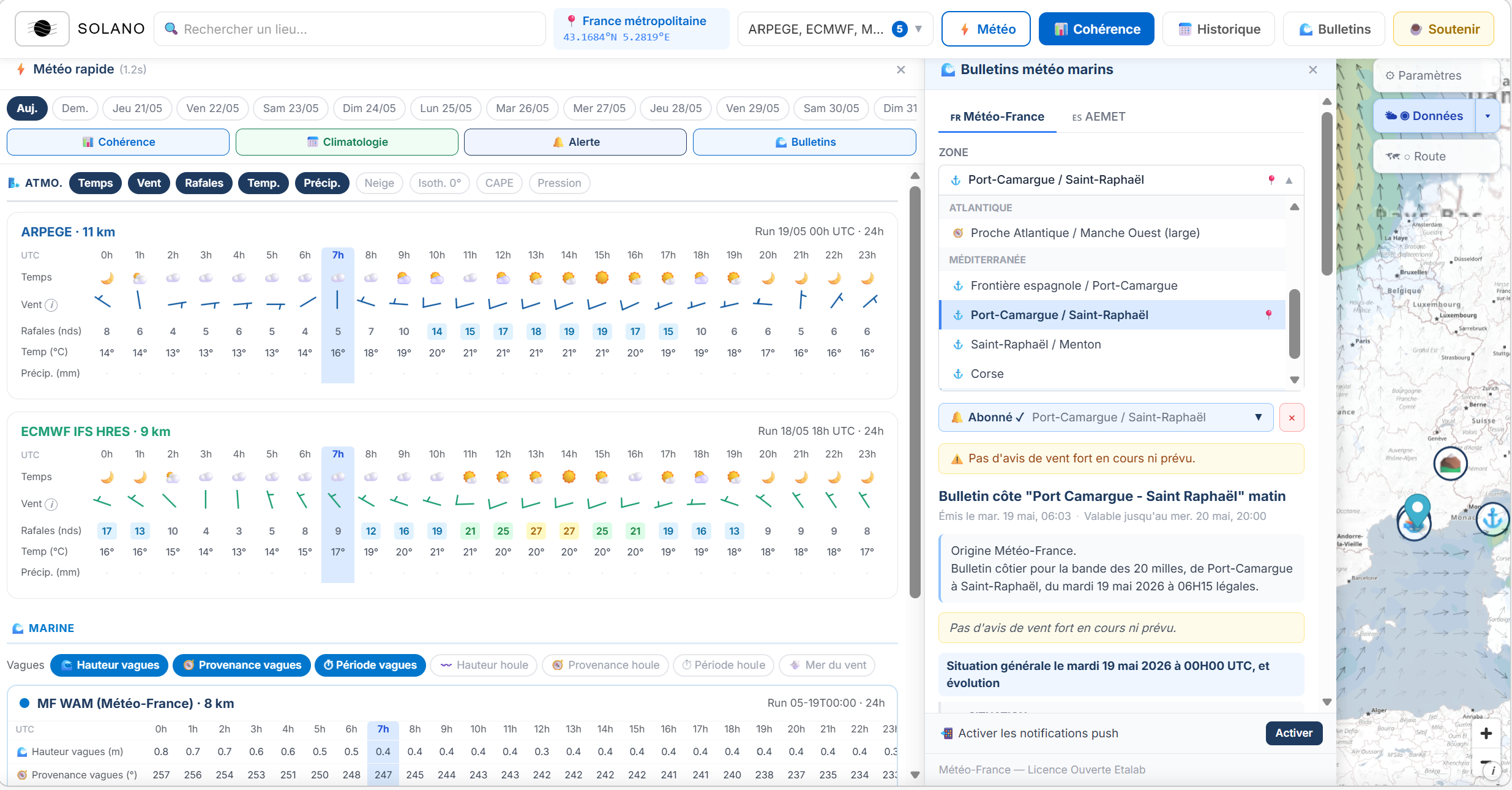
Pre-selected based on the requested weather point.
Choose a recent bulletin with actual content (wind, visibility, sea).
Active BMS warnings
If a BMS is in force over your area, a warning banner appears at the top of the Bulletins panel — the BMS number, the zone concerned, the announced conditions. The same goes for the equivalent warnings of the other providers (AEMET gale warning, Met Office strong wind warning).
Warnings right in Quick weather
No need to open the Bulletins panel: as soon as you check the weather for a point, a "Warnings in force for the area" banner appears automatically when relevant (and stays silent otherwise). It lists the marine warnings (BMS and equivalents) and the MeteoAlarm warnings concerning your exact point, with each one's issuer and validity period. Each warning fits on one line and expands with a click to show the full bulletin text or, for a MeteoAlarm warning, its description and instructions.
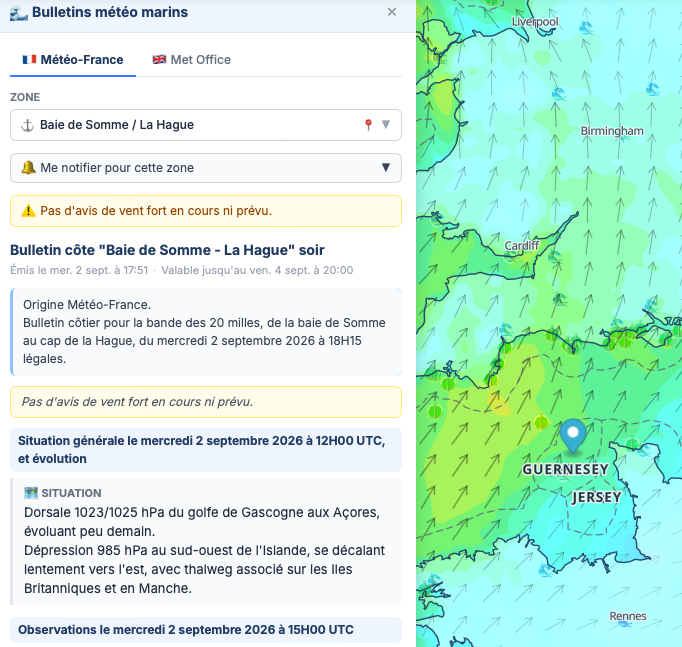
4. Subscribing to alerts
Reading bulletins is free. To receive a notification on every new issue or every BMS, you need to subscribe — an account is required.
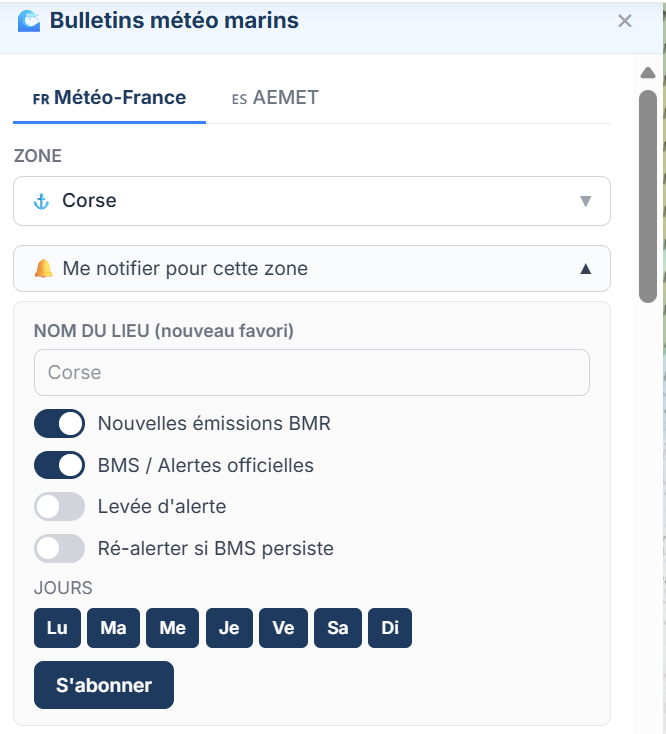
From the Bulletins panel, use the "Subscribe" button on the desired zone. Four events can be configured independently:
BMS persists — a reminder if the BMS is renewed without change on a new issue (a sub-option).
5. Email and push notifications
✉️ Automatic email
As soon as an event you're subscribed to occurs, Solano sends an email to your account address. The email contains the full bulletin text or the BMS warning detail — number, zones concerned, conditions — along with a direct link to the map.
The email subject lets you identify the type of event at a glance:
⚠️ Golfe du Lion | BMS n°3 — Marine warning in force✅ Golfe du Lion | BMS n°3 — Marine warning lifted
📲 Push notifications
Push notifications cover all your subscriptions — bulletins and weather alerts together — from a single activation per device. Turn them on from the Bulletins panel → "Enable notifications" button.
The push notification arrives a few seconds after the email. It's especially useful for BMS: getting a warning on your phone without having to open the app can make the difference when planning an outing.